Friday, September 20, 2013

Creating a Successful Development Environment: Trial and Error

Written By Bryan Page,
Developer at Rockton Software
Originally, development was a very time consuming process requiring the use of super computers and large processing times. Technology evolution has made things much easier for developers with personal computers. Since personal computers, the process has become more localized for a developer; you pick your favorite editor, write your code, compile it, and test it on your local machine. This has worked wonderfully for most programs and programmers for a long time, and it is still adequate for a large sector of the development community. However, once again, we are seeing applications being developed that require the use of full servers to develop, process, and test applications. In our case, we found that to be true for when we work with our business line of applications that make your work simpler and easier.

When developing for an application such as Microsoft Dynamics CRM, there are many moving pieces that need to be in place and set up in order to test code successfully. Essentially, it takes a full server configuration for each developer and tester if not a full multi-server configuration for end to end coverage. The old school thought process would be to buy each person a cheaper server that they can use to develop and test against which does still work, but this is certainly not the most productive approach out there. Setting up, maintaining and protecting each of the machines is a huge time suck for everyone involved. You now have doubled, tripled, or more the amount of machines that are most likely configured differently, breaking at times, data loss which when failure occurs, will take does the developer but probably also your IT department.

Many companies have taken to the cloud for a solution. There are many providers out there that are offering hosted servers that can allow you to set up servers that are partially preconfigured, create backups, take snapshots, etc. With most companies claiming higher than 99.98% uptimes and a multitude of pricing options—this is certainly a viable solution. This allows you to replicate your environment for each person and let them drop their own code on top of that. If a failure occurs, you can simply rebuild, redeploy, and be back up in 15-20 minutes without having to take the time to troubleshoot machine issues that may have been introduced. Since each developer would have their own environments, you still are maintaining isolation between each other, but you can assure that they are all using the same infrastructure for their development work and testing.

One thing about the cloud hosted option is that most likely behind the scenes the hosting servers will be running Microsoft’s Hyper-V. Hyper V was introduced into Windows Server 2008 as a beta and included with the Windows Server 2008 R2 as a full product. It continues to be included with the Windows Server 2012. This doesn’t help the end consumer that is attempting to get away from maintaining servers, but the big win comes with Hyper-V being introduced and packaged with Windows 8. This now gives us the ability to run hosted virtual environments directly on our local PCs. What benefits do we gain from running Virtual Environments on our local PC? Essentially, we eliminate the dependency on internet connections and guarantee developer isolation; by having machines on our workstations, we no longer have to worry about network latency causing delays or network drops. The speed increase publishing code out to our local machines versus over the internet has proven to be 2-10x as fast simply by taking internet connections out of the picture. This also eliminates the concern with developers grabbing the wrong IP and accessing the wrong server and no firewall restrictions to find ways around.

To get a personal workstation or laptop with large amounts of RAM and a solid processor capable of hosting the Host OS, as well as several virtual environments, has a higher initial investment than what you would use for a standard PC. But, from what we have found, here at Rockton Software, with the productivity increase, reliability and savings over running hosted machines, the initial investment makes up for itself quickly.

Rockton Software www.rocktonsoftware.com had been talking about creating an environment for developer isolation, but when multiple developers are working on a project together, there is also the need to combine all their work into one location or solution. Yes, you could have meetings to connect together and manually try and merge the different components, then test the project as a whole, but there is a large amount of wasted time in that approach. What seems to work best is using a good source control tool. We have found that Team Foundation Server works great to meet our needs as it integrated well with Visual Studio. This allows us to check in and lock files, merge any conflicts that may arise, track code reviews, this creates branching paths and backups the code that we have been working in giving us a sound mind that our code is safe, and that we can keep track of revisions and who made them. Similar to server situations, you can either host your own machine to act as the Team Foundation Server or find one of the many hosting companies that will host and maintain the server for you and provide you with access.

With Team Foundation Server, you are looking to centralize the machine so that everyone can gain access to it. Once the developer has pulled down the latest code, they will use the code as-is in their isolated environment. When they have completed their task, tested that it meets requirements, and successfully built the solution using their changes, then they will connect again and publish out the changes, thus, allowing other developers to see the changes. This gives you the ability to maintain developer isolation with the ability to still collaborate and team build on a project together all while working on their local PC.

We, Rockton Software, have found a combination of developer isolation and developer collaboration by combing a local Hyper-V instance and a hosted TFS solution. Looking back, I do not know that we would want to go any other route for our CRM development: Connect. Hopefully, you are able to set up in a similar way, but if not, I would suggest at least giving it a try. Once you see the benefits, I would bet that you won’t look back either!

As always, if you think you have a better way—let us hear it! We are always looking for ways to increase productivity and reliability!

Monday, September 9, 2013

Rockton Software: Leading a Virtual Company

Written By Kelli Sexton,
CEO of Rockton Software
Rockton Software www.rocktonsoftware.com is a virtual company with employees living in five different states.  This came about partially because we hire talent no matter their locale, but it is also a result of Mark and me living in three different states since starting Rockton Software!

We work hard to create a culture where the team thrives even though we meet infrequently face-to-face. The keys to our success are communication, clarity, and visibility, which derive from the dreaded 8-letter word: meetings.  While we once feared the connotation that meetings are willy-nilly and unfocused, it wasn't until some of our team members requested more formal meetings that we started putting them in place.  We are now more successful by having departmental teams meet daily and our company meetings twice a month.

Our daily meetings, or scrums, were adopted from agile methodologies.  These are short meetings where each person reports what they got done yesterday, what they are committed to completing today and any roadblocks impeding their progress.  Fifteen minutes is sufficient for everyone to get on the same page. These brief meetings have brought us the visibility into what the other team members are committing to and accomplishing, and help us better meet our departmental goals and objectives.

Our twice-monthly All-Company meetings help bring everyone together to understand what the other departments are working on. They are also an opportunity for the Executive Team to share changes, concerns, and insights.  Additionally, each of us gets to share personal challenges or celebrations.  Since we don’t get to have casual gatherings around the water cooler, these shared moments help us feel closer. We also plan two All-Company Retreats. These in-person gatherings create opportunities for team building, brain storming, and problem solving.

Along with our meetings, our adoption of Lync, Outlook Calendars, SharePoint, and Team Foundation Server have helped us improve visibility and communication.  We have found with the right team members, creating well-structured productive meetings, and embracing collaborative technologies that running a virtual company can still provide a great team environment and a real sense of family.

Follow us on Twitter to stay updated with Rockton Software https://twitter.com/RocktonSoftware!

Wednesday, August 28, 2013

Share Your Business Needs!

Each business has different needs or processes they are trying to improve! Getting the most out or your Microsoft Dynamics GP system is imperative!

Rockton Software wants to help.

Do you have any of these business needs?
Save Time, Save Money, Increase Productivity, Accurate Data, Security, Utilize Investments to Fullest Potential, Track Data, Reporting, Customize Software, Software Version Control, Business Processes, Training, Internal Technical Support, Simplicity

If so, head to www.rocktonsoftware.com/Aug13Social and tell us your business needs! You will be entered to win a Kindle Fire HD!

Tuesday, August 20, 2013

Rhonda's Musing: I love going on vacation! But who doesn’t?

Written By Rhonda Sutliff, Product
Specialist at Rockton Software
It is always an adventure when we go to new places and try new things. Most people have done the typical vacation in the big cities with amusement parks, zoos, museums, and beaches. But I believe it’s the little places that we don’t normally think about, when considering destinations, which are the best. So, if you might be considering a non-typical destination this year, maybe one of my top five vacation destinations might intrigue you!


  • Key West, Florida: Okay, I realize this is probably a destination you would think of, but it is my favorite vacation spot, and there is so much to do: snorkeling, sunset cruises, parasailing, etc. There also are a lot of museums; the Hemingway House with the 6 toed cats, and my personal favorite, the Mel Fisher Maritime Museum, where you can see shipwrecked treasures. Plus, Key West is small, so everything is a hop, skip, and a jump away! 
  • Camp Springs, Kentucky: I love visiting vineyards and wineries in the Camp Springs area; you can take the Back Roads wine trail and visit each of them. This tour is not something to rush through because there are historic houses along the way that date back to the 1800s—but don’t forget a designated driver! If wine is not your thing, the Newport Aquarium is only about 15 miles away; it contains multiple exhibits, and they have glass floors, so you can walk on the water. For shopping, I recommend heading to the Main Strasse Village in Covington, KY; it is a restored 19th century German neighborhood with cobblestone walkways.
  • Savannah, Georgia: This may be a place you consider, but many people seem surprised that I vacationed here. Savannah is the oldest city in Georgia, so it makes for a great history lesson! It is over-flowing with historic landmarks, museums, and plantations. The neat thing is you have your choice of tours: walking, bus, carriage, and trolley. Of course, a historic city would not be complete without ghost tours, and there are plenty! But, my favorite thing about Savannah are the squares. I do not mean nerdy people, but rather the way the city is broken up; each square is surrounded by eight blocks. For example, the Forrest Gump bus stop scenes were filmed in Chippewa Square.
  • Metropolis, Illinois: Yes, there really is a Metropolis city. This is the place for all things Superman! There is a giant Superman statue in town and a Superman Museum. Once a year, there is the Superman Celebration, usually the first weekend in June—you never know what celebrities will show up for the celebration!  
  • Brainerd, Minnesota: This is closer to home for me (Fargo, ND), but it is still a great place to visit! It is known for the 26 foot tall, animated Paul Bunyan at Paul Bunyan Land. Although, this attraction is mainly for kids, adults tend to enjoy it, too. It includes amusement rides and a petting zoo. There is also the Paul Bunyan State Trail; the trail is 112 miles and links the communities around Brainerd together. Since it is paved, it is perfect for bike riding, walking, or rollerblading. But, my favorite part about Brainerd are the lakes for water sports like fishing, kayaking, and tubing. 

There you have it!  My top five vacation destinations that you typically wouldn't think of! No matter where you are, there is always something to do! It is up to you to make it fun! And legal, it should always be legal.

Manage your subscription preferences to receive all Rockton Software Musings by clicking this link: http://rocktonsoftware.com/Subscriptions/Manage.aspx!

Tuesday, August 13, 2013

August 16th: GPUG New Orleans Regional Chapter Meeting

Are you in the New Orleans area this Friday, August 16th?
If so, don’t miss out on Rockton Software presenting at the GPUG New Orleans Regional Chapter Meeting! It is from 8AM – 12PM.

Where is the GPUG New Orleans Regional Chapter Meeting located?
CGB Enterprises, Inc.
1127 East Service Road
Highway 190
Covington, LA 70433

What time is Rockton Software presenting?
11AM – 12PM

Who is presenting from Rockton Software?
Rhonda Sutliff, Product Specialist, is presenting remotely.

What is Rhonda’s background?
Prior to joining the Rockton Software team, she was working for Microsoft Dynamics GP support for 11 years. Currently, she is one of the newest members of the Rockton Software team. Her title is Product Specialist, this means that she focuses on making our products work simpler and easier for our customers.

For more information regarding the GPUG New Orleans Regional Chapter Meeting, click this link http://www.gpug.com/events/gpugneworleansrc08162013.

Keep updated with Rockton Software by following us on Twitter https://twitter.com/RocktonSoftware.

Tuesday, August 6, 2013

Setting Up a Launch Point in Dynamics Report Manager

Written By Rhonda Sutliff, Product
Specialist at Rockton Software
A partner of ours was attempting to set up a launch point in Dynamics Report Manager (DRM). He wished to print a Crystal report and to cancel out the Report Writer report, thus, being able to print his quotes from Crystal rather than Report Writer. He created his batch report within DRM correctly, but when he was printing the quotes from the Print Sales Document window the Print Destination window was still coming up for the Report Writer report.

In order to prevent the destination window, we needed to create a launch point that cancelled the window after the Crystal report has been scripted to run.

Launch Point Maintenance Settings Tab: 
On the Field Entered, you can trigger which is essentially the Clear button in the Print Sales Documents window.


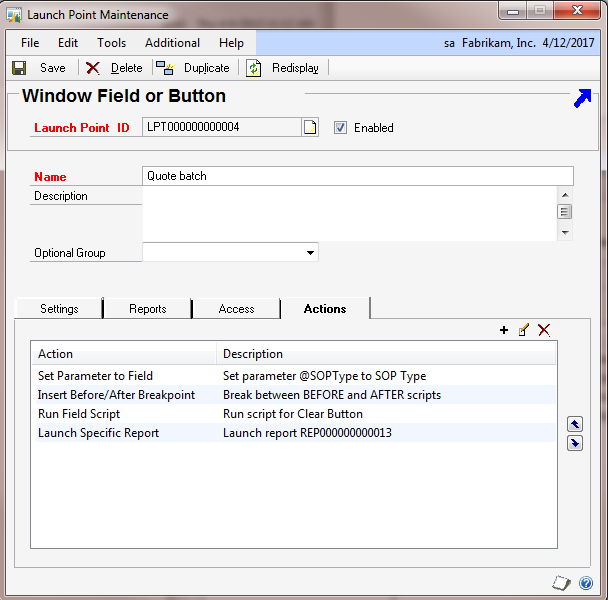
Launch Point Maintenance Actions Tab:
You can set the following actions to run the Crystal report and to set up a Run Field Script to run the clear button. This will then avoid the Report Destination prompts for the Report Writer reports.


Now with this launch point, you can go to the Print Sales Document and print your documents using Crystal (or another report) rather than Report Writer.

Wishing to learn more about Dynamics Report Manager? Click here to view a demo! Or, you can contact Rockton Software Sales at sales@rocktonsoftware.com.

Monday, July 29, 2013

Some Microsoft Dynamics GP 3rd Party Products are Bullies

Pam Rasmussen, Sales Support
at Rockton Software
Not all third party products play nicely with each other, which can cause conflicts. You may find after installing a third party product, other third party products you have installed can suddenly start producing errors or behaving strangely.

All of our products play nice with most third party dexterity-based products in the Microsoft Dynamics GP playground. We have trained them well, however, there are always new ones coming out. So, we have created a simple and easy way for you to get around those “bully” products.

In each of our products on the Setup window | Troubleshooting tab, we have a “Move to First Position” task. It’s as easy as one click. This task automatically places our product just under Dynamics GP in the Dynamics.set file. It will now load just after Dynamics GP, but before any of your other third party products. This eliminates the potential for the “bullies” to interfere with our products.

At Rockton Software, we strive to make the customer experience simple and easy. This is just more way of meeting that goal.

Download your COMPLIMENTARY copy of the Summer 2013 Edition of The GP Optimizer Magazine to check out great Microsoft Dynamics GP Add-On Partners www.rocktonsoftware.com/GPOMSignUp!